02 April, 2005

3D Anime Style Space Warship (How I do this)
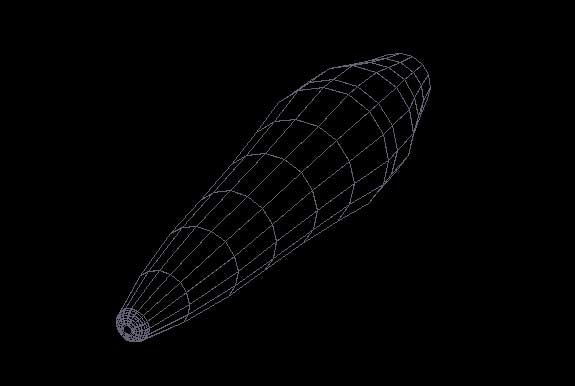
Well here I go, First off, Anime Style SciFi is my favorite topic. The concept is based on Naval Ships with a Scifi twist.

I create a cylinder and extrude both ends to create a "boatish" hull shape. I always keep copies of my meshes and hide them just in case something goes wrong... I do a lot of Boolean cutting (Chopping an object with another object) and this can cause sudden failures. So keep this all in mind.

Reply

17 Comments

Richard K 02 Apr 2005

Now with the hull shpae made, I chop off the top deck with another cube (This is Boolean cutting) I then select the deck face and extrude it out, I even do this to the bottom to create the fin. I then pull out (by extruding) the command castle (Bridge), I then add another layer and place Cylinders for the side weapons bays and finally, I make a pair of scoops.

Richard K 02 Apr 2005

Now remember to keep copies of the hull, this is very important to have a hidden backup (it saves time) and you will see with my techique, the importance.

Richard K 02 Apr 2005

Selecting the hull I create a copy and scale it smaller. then I give it a darker color and hide it.

the Wireframe shows I boolean cut into the original hull and chop chunks right out of it. I even chop the fin and the back of the engine. Then I unhide the scaled/colored hull... poof! I have kewl impressions. I could union these together but I prefer to work on them as seperate objects for better texturing.

Richard K 02 Apr 2005

I then start to work on the cylinder weapon bays on the sides of the ship, the same technique of copying/scaleing/recolor/hide... chop the original... (in this pic I hid the outter hull so I can use the inner core-hull as a reference

Richard K 02 Apr 2005

I then unhide the outer hull and the inner weapon bay cylinders

Richard K 02 Apr 2005

I then work on the Engineering section (behind the Bridge) I do the same Copy/Scale/Recolor/Hide... chop the original...

Richard K 02 Apr 2005

And then unhide the copy...

Richard K 02 Apr 2005

Creating the Bridge. The original hull copy (hidden) is copied again. I then chop off the entire hull and keep the bridge portion... scale it smaller, and give it a transparent-blue window shader.

I then hide it and cut window squares out if the inner core hull. I then unhide the transparent bridge portion and the effect is shown...

Richard K 02 Apr 2005

Now for some outer Armor...

Taking the original hull shape (see why I always have a hidden copy?) and I scale it larger and give it a metal sheen (the colors are temporary as I will use UV Texture mapping for the final render). I take this mesh and shell it and then boolean cut it with cubes/shapes to create the armor banding... I also did more boolean cuts on the back of the scoops.

Richard K 02 Apr 2005

And here is the front view, I had to position the armor banding to look its best.

Thats it for now, I will start a new tutorial to show how to make weapon turrets, more fins and finally UV mapping, on the same Warship.

Thanks for checking this out. Any Questions?

Richard K 02 Apr 2005

Almost done... added turrets and some textures...

Richard K 02 Apr 2005

Another view... need to fix the texture on the outer wing bay.

Richard K 03 Apr 2005

With Grav Stabalizers in place... (remember this is a Japanese Colony) All I need is decals and FX's and its complete.

N. Michael Bryant 08 Apr 2005

I love it, man! nice work. Impressive!

Robert Longfield 08 Apr 2005

What software??

Richard K 09 Apr 2005

I'm using Truespace v6.6 (www.caligari.com)

Robert Longfield 09 Apr 2005

Great tutorial! Thanks!

Reply