03 November, 2005

PENCIL SCANS MADE PAINLESS

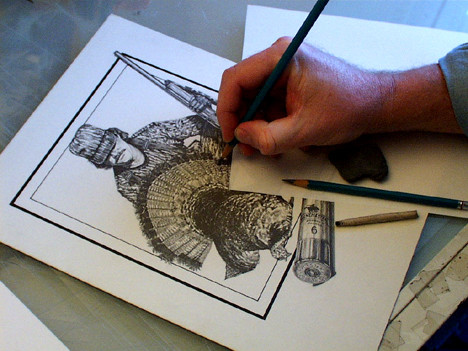
As a pencil artist, I have fought and fought the variables that go into getting an original pencil drawing the way I want it. Several years ago, I would go around and around with my cameraman. I wanted more detail. He said you can't have white, whites without sacrificing your lightest gray pencil strokes. Or you can't have black, blacks without losing darker grays. I was never happy. I finally found my self years later sitting in front of a computer manned with a piece of equipment called a "scanner." No more fighting with a cameraman! But the fighting was hardly over. It was the beginning of another battle, just a different day. It was a "Showdown." It has taken me almost seven years to get my scans the way I want them. And, I have won. I am finally satisfied.

I am going to go through the steps of a "general" scan of a completed pencil as I would for publishing. Whether it be for a magazine story, numbered prints or for show here on the internet, the final save of the DPI (dots per inch) is the only difference.

I am an artist who draws with a pretty heavy hand. Most of my pencils are fairly dark and with a lot of contrast. But, I do have some really light detail that I want to be picked up as digital information. I want it all. I would rather get as much as possible in the scan and not have to rely on PhotoShop to "save my butt." I am not beyond fixing something in PhotoShop if it means being completely happy with the final result. As some of you have read somewhere else here in this forum, I am a "graphic artist", not a fine artist. I will do whatever it takes to produce a job quickly and efficiently.
Reply

26 Comments

WESTERN ARTWORK By Denny Karchner 03 Nov 2005

I use a Microtek ScanMaker V6upi flatbed. This is not a real expensive scanner. In the $100 range, maybe less now. I know that you are not all going to have the same scanner. As said before, I am going through a "general" scan. I will show you some of the menus and adjustments that I have and use. Your scanner will probably not be the same, but it might have some of the same adjustments. It will give you something to look for and be aware of.

WESTERN ARTWORK By Denny Karchner 03 Nov 2005

I try with all my might to keep my drawings under the 11"x14" size that my scanner bed will handle. Scans can be pieced together but that is another tutorial. Save some grief and do your pencil drawings to fit your scanner for the time being.

This sounds like a "no-brainer", but really try to position your original in the scanner bed as straight as you possibly can. It is really a lot easier to work with a scan that is scanned straight from the beginning. One other thing, most scanners start scanning at the end facing you or the front of the scanner. Try to position your art as close to this end as possible. Dont make your scanner scan an area with nothing in it. I will even turn my original side ways to fit the scanner bed better to save making the scanner read blank information that is along the sides. You can always rotate it 90 degrees later if needed.

WESTERN ARTWORK By Denny Karchner 03 Nov 2005

First I open my scanning program. Then I do a "prescan" or "overview." This gives a quick picture of the original. Then I go in and set my "Type" of scan to "Gray Scale." Sometimes it could be "halftone" selection. This is very important. I never scan a black and white pencil drawing in "color", RGB or otherwise. You always seem to get odd colors through out the scan.

This is when I use the "scan select tool" to surround the exact area that I want to scan. This area has what is usually called "marching ants" moving around the outside of the selected area like PhotoShop. Frame it like you would matt an original. Look close and make sure you have the complete area selected. Most scan programs have a "zoom" tool so you can get a close look.

WESTERN ARTWORK By Denny Karchner 03 Nov 2005

Next, I set the "DPI." I usually scan most of my pencils at 300-600 dpi. I do this so that I have a high-resolution copy for my portfolio. If I am scanning for the internet 72-100 dpi is OK. Remember, the higher the dpi the harder your computer will run. If you want the two different dpi settings, do the high-resolution first and do a "file save as" and name it different. I usually end the names that I am saving as with the dpi number.

WESTERN ARTWORK By Denny Karchner 03 Nov 2005

The next few steps are where I start to make adjustments to the appearance of the scan. I started a process several years ago to establish a starting point to work with and that is the basis that I use today. Ill warn you, this is a real "pain in the butt." I think it is well worth the time. I used to take a small area of the pencil drawing, like maybe just the head and face with some white background included. Maybe a two inch square. Try to get a section that has really dark darks, really light grays, and white whites. Using the scan select tool, select just this area. Go through the scan adjustments that are going to follow and keep a really good record of your settings. You might have to go through many different settings until you are happy with the best scan. It is so much faster to scan just a small area of the pencil drawing than scanning the whole piece when testing.

Next, I go to the level adjustment menu. A bar graph appears when opened. On one end of the bar are your blacks and whites on the other end. I slide the pointers until they reach the information that is seen as raised areas, like small mountains. You will notice your scan starts to get some life to it. It is reading all the information that is there. Nothing is wasted. You will have to play with this a little until you see what you like. Remember, this is not hard and fast. This is a matter of opinion, your opinion of what you think best represents your art. The object is to get "all that is there." If you take the time to draw it, take the time to get every little pencil mark.

WESTERN ARTWORK By Denny Karchner 03 Nov 2005

The next adjustment I use is the "Tone Curve." I could do a whole other tutorial on just this tool but I will opt for a quick explanation. If you click on the diagonal line, put a point dead center in the box. Begin to push and pull on the diagonal line in different areas. A lot of the time if you make a slight "S" curve with no sharp bends you see a difference in the contrast and tone. I can usually accomplish what I need with the level adjustment tool. Just play with this. You might light the results

WESTERN ARTWORK By Denny Karchner 03 Nov 2005

The Brightness & Contrast tool is pretty important. This is where you will make or break your scan. Depending on your paper, white, off-white, or other, this is where you want to maximize the two settings to get rid of the paper color if you want "pure white" paper. But be careful not to overdo it or you will start to lose your lightest gray pencil lines. I mean to tell you, these two settings, brightness & contrast are a real "bear." Do a lot of test runs here. I have found on my heavy-handed pencils done on extremely white illustration boards I end up with the two settings in a slight negative position. Usually around -2 to -7. But there are always exceptions. Just do the tests and document really accurate settings that you used.

WESTERN ARTWORK By Denny Karchner 03 Nov 2005

Filter tools are helpful some times. You can "sharpen", "blur" and so on, but I prefer to do this step in PhotoShop if I need it.

WESTERN ARTWORK By Denny Karchner 03 Nov 2005

Now comes the time to save your scan. Just pick a name that is easy to remember. If you are doing the test scans, you can keep the same name for each and add a different number to the end. Make sure that you keep track of what settings go with what number. Really important stuff. I have a Scan folder just to save all my scans. It is just a temporary place to keep them until I am sure that I have a file saved in another place. I usually save mine as .tiffs. You can file as .jpgs or any other format that you want to work with.

WESTERN ARTWORK By Denny Karchner 03 Nov 2005

I then open PhotoShop, go to the Scan folder and open the scan. This is where I make the final adjustments. There are the same types of tools in PhotoShop that are in most scanner programs. Contrast, brightness, and so on. I usually check to make sure that my whites are white here. A good check is to paste the final in a white area, if you see gray where there should be white paper, then you need to adjust the brightness and make the whites, whiter. You should not see any paper edge or shadows.

WESTERN ARTWORK By Denny Karchner 03 Nov 2005

One more thing that you don't want to forget, if you are posting your pencils here in the ArtWanted.com site, don't forget to save a version for here in RGB. If you scanned in grayscale, it might give you an error if it isn't RGB.

WESTERN ARTWORK By Denny Karchner 03 Nov 2005

Well if you have "hung" with me this long, you get to see the final scan. I know this is some long reading, but if I can save someone the swearing and grief that I have gone through over the years, I feel that I have accomplished something here. I hope to save you a "Showdown." Please feel free to contact me with any other questions or comments that you might have. --Denny Karchner/Buffalo Graphics

Sarah-Lynn Brown 04 Nov 2005

Genius!!

Melissa Rinaldi 05 Nov 2005

Denny you are awesome at teaching....!!!! :)

Trish Ellis 11 Nov 2005

Thank you for taking the time to post this tutorial!

jay dawn 07 Feb 2007

thankyou. your tutorial was exstemly helpfull i will knoe attempt to apply it. xxxx

Chris Hoffman 15 Feb 2007

Wow....old thread. Denny I have that exact same scanner you had here, and it has worked for 5 years but now it streaks the scan and I spend alot of time cleaning up the lines from the scan. It's also noisier than a busted tooth chainsaw but I can't seem to kick it to the curb which I should have done 2 years ago.

WESTERN ARTWORK By Denny Karchner 13 Jan 2009

Hi all! I figured I would bump a couple of these buried tutorials up those who are new and haven't seen them yet.

Hi Chris. That scanner finally gave up the ghost and I am now using an Epson now. Works pretty good.

Thanks to all who posted.--Denny ;{

Minnie Shuler 16 Jul 2009

Thank you.

Linda Eades Blackburn 19 Jul 2009

Hey, thanks Denny. I was hoping this one was still around.

Wanting to work on some pencils soon and thought I might need this.

This discussion continues on the next page...